
AI Coding IDEs Compared — Antigravity vs Kiro vs Cursor vs Codex vs Claude Code
AI coding tools have moved far beyond autocomplete.
Modern developer environments can understand repositories, edit multiple files, run terminal commands, test applications, use browsers, delegate work to agents, and increasingly complete entire engineering tasks with limited supervision.
That creates a simple question:
Which AI coding tool is actually best for developers?
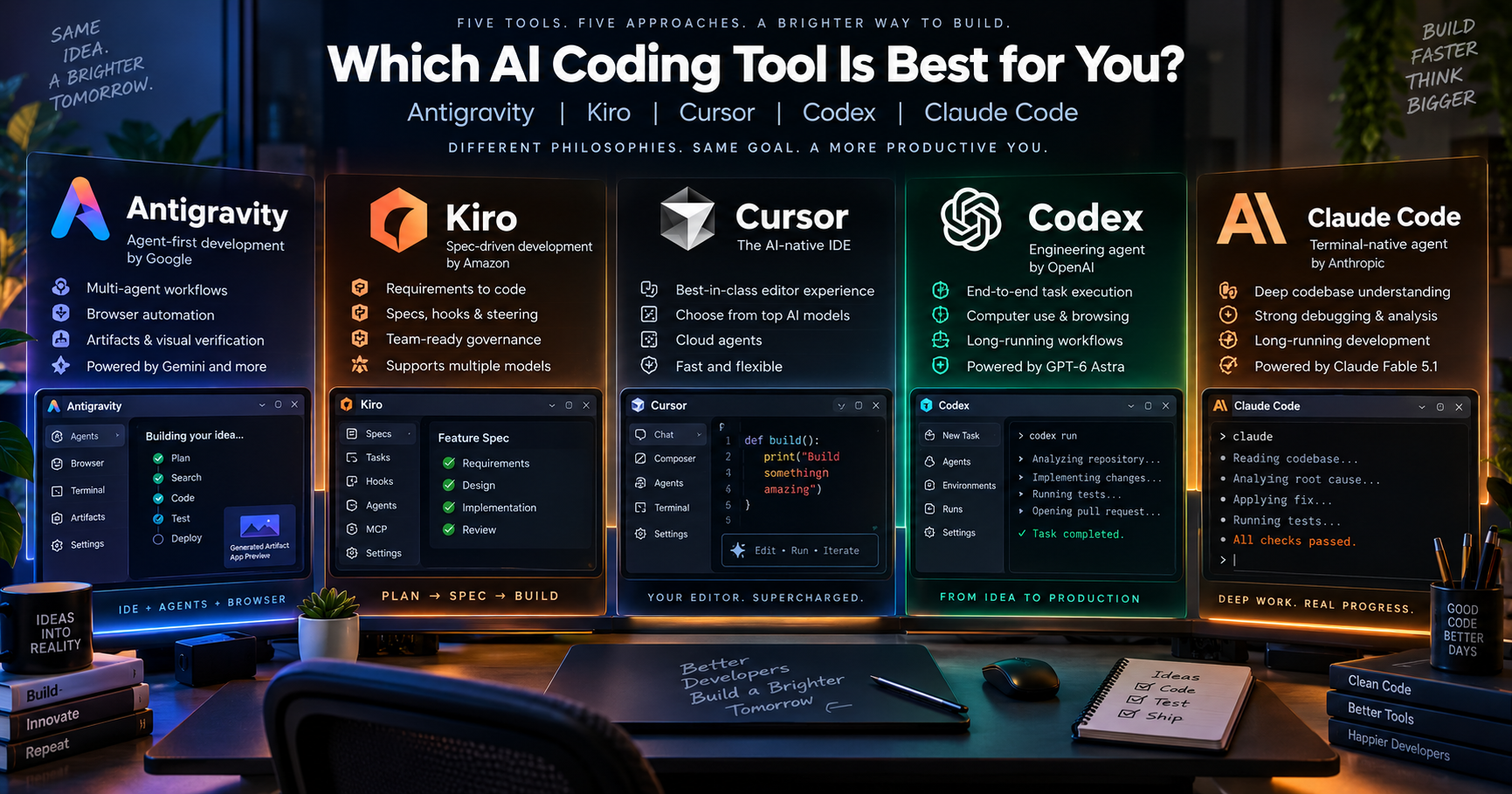
Five products stand out today: Google Antigravity, Amazon Kiro, Cursor, OpenAI Codex, and Anthropic Claude Code.
They are not the same kind of product.
Cursor and Kiro are IDE-first.Antigravity is agent-first and now has a standalone agent command center. Codex and Claude Code are coding-agent environments that can also integrate with existing editors.
Here is the practical comparison.
Feature Comparison Table
| Category | Antigravity | Kiro | Cursor | Codex | Claude Code |
|---|---|---|---|---|---|
| Core Approach | Agent-first development | Spec-driven development | AI-native IDE | Engineering agent | Terminal-native agent |
| Best For | Browser + multi-agent workflows | Structured team development | Everyday development | End-to-end autonomous work | Deep repository work |
| Model Choice | High | Very High | Very High | Medium | Low/Medium |
| Autonomy | Very High | High | High | Very High | Very High |
| Ease of Use | High | High | Very High | High | Medium |
| Main Advantage | Agents + browser + artifacts | Specs + hooks + governance | Editor + model flexibility | End-to-end execution | Deep coding and debugging |
| Main Weakness | Product consistency | Extra process | Model choice can add complexity | Less model freedom | Terminal-first learning curve |
| Overall | 9.2/10 | 9.2/10 | 9.5/10 | 9.4/10 | 9.3/10 |
These ratings are an independent practical assessment, not official vendor scores.
Google Antigravity
Antigravity is built around an agent-first workflow.
Its agents can operate across the editor, terminal and browser, while producing structured artifacts such as implementation plans, diffs, diagrams and browser recordings. Multiple agents can also run in parallel.
Antigravity 2.0 takes that idea further with a standalone desktop command center for launching and monitoring agents, using tools such as Chrome, file operations, web search, MCP and sub-agents.
Models
Antigravity currently provides Gemini 3.8/3.7/3.6 Flash, Gemini 3.1 Pro, Claude Sonnet 4.6, Claude Opus 4.6 and GPT-OSS-120B, with availability depending on plan.
Strengths
Excellent agent autonomy
Parallel agents
Browser automation
Artifacts and visual verification
Strong Google ecosystem integration
Weaknesses
Agent-first workflows can feel unfamiliar.
The split between Antigravity IDE and Antigravity 2.0 is not universally appreciated.
Developer feedback is mixed: some users praise its speed and capability, while others report quota, reliability and workflow frustrations.
Best for: developers who want the agent to operate across code, browser and other development surfaces.
Amazon Kiro
Kiro takes a more structured approach.
Instead of simply telling an agent to “build this,” Kiro can turn a request into requirements, technical design and implementation tasks. Its workflow also includes steering, hooks, MCP, skills and custom agents.
That makes Kiro particularly interesting for teams that care about repeatability and engineering discipline.
Its Autonomous mode can clarify requirements, plan the work, delegate to specialized sub-agents and automatically open a pull request when finished.
Models
Kiro currently supports models from OpenAI, Anthropic and several open-weight providers, including GPT-5.6 variants, Claude Opus 5, Sonnet 5, Haiku 4.5, DeepSeek 3.2, MiniMax M2.5, GLM-5 and Qwen3 Coder Next, plus Auto routing.
Strengths
Excellent specs and requirements workflow
Hooks and steering
Strong model flexibility
Good team governance
IDE, CLI and web workflows share the same core capabilities.
Weaknesses
More process can mean more friction.
It is less lightweight than simply prompting an agent and letting it run.
Developer feedback includes complaints around workflow friction and reliability, although experiences vary significantly.
Best for: teams that want AI-assisted development with an engineering process, not just autonomous code generation.
Cursor
Cursor remains the most balanced product in the group.
It starts with a familiar editor and adds an agent that can search the codebase, edit files, use the terminal and search the web. Cursor also tunes its agent behavior for the different frontier models it supports.
Its biggest advantage is simple:
you get a full IDE and freedom to choose the model.
Models
Cursor supports models from OpenAI, Anthropic, Google, xAI and Cursor, including Claude Fable 5.1, Claude Opus 5, Claude Sonnet 5, GPT-5.6 variants, Gemini 3.1 Pro, Gemini 3.8 Flash, Grok 4.6, Grok 4.5 and Composer 2.5.
Cursor also provides Auto routing and cloud agents that run in isolated development environments, can operate in parallel, build and test software, interact with browsers and open pull requests.
Strengths
Best overall IDE experience
Huge model choice
Strong agent tooling
Cloud agents
Excellent editor integration
Low friction for developers moving from traditional IDEs
Weaknesses
Too many model choices can create decision fatigue.
Costs and behavior vary depending on the selected model.
Cloud agents require repository and environment configuration.
Best for: most developers who want one polished IDE with access to multiple AI providers.
OpenAI Codex
Codex is not really trying to be another traditional IDE.
It is an engineering agent that can be used through ChatGPT, the Codex app, IDE integrations and the CLI. OpenAI's current product direction is centered on letting the same agent work across development surfaces and on long-running engineering tasks.
Its biggest advantage is task ownership.
Instead of helping with every line, Codex is designed to take a larger assignment, inspect the repository, make changes, run tests and continue through the engineering workflow.
Models
Codex is centered on OpenAI's model family, rather than functioning as a multi-provider model marketplace like Cursor or Kiro. OpenAI's latest Codex workflows span the app, IDE and CLI.
Strengths
Excellent end-to-end engineering
Strong autonomous workflows
Terminal + IDE + cloud workflow
Parallel agent execution
Strong code review and testing workflows
Weaknesses
Less model choice than Cursor or Kiro.
Stronger ecosystem commitment to OpenAI.
More autonomy means permissions and environment controls matter more.
Best for: developers who want to delegate substantial engineering tasks instead of continuously prompting an assistant.
Anthropic Claude Code
Claude Code is the most terminal-native product here.
Its interface is designed around the repository, shell, permissions and iterative development rather than a traditional graphical IDE. Anthropic also provides a native VS Code extension for developers who prefer a more visual workflow.
Claude Code is particularly strong when the task involves understanding an unfamiliar codebase, debugging complicated behavior or carrying a large refactor through multiple stages.
Models
Claude Code is built around Anthropic's Claude family. Its current flagship Claude Fable 5.1 is positioned specifically for ambitious coding projects, large codebases, code review and long-running autonomous sessions.
Anthropic reports 55.8% on Terminal-Bench 4.0 and 73.4% on CursorBench 3.2.0 for Fable 5.1, alongside strong computer-use and automation results.
Strengths
Excellent repository reasoning
Strong debugging and root-cause analysis
Long-running coding
Powerful terminal workflow
Strong permission and automation controls
Weaknesses
Higher learning curve for GUI-first developers.
Less model diversity than Cursor or Kiro.
Best results often require comfort with terminal-based workflows.
Best for: developers doing serious repository work, debugging and long-running engineering tasks.
Which One Gives You the Most Model Freedom?
There is a clear winner:
1. Cursor — 9.8/10
OpenAI + Anthropic + Google + xAI + Cursor models.
2. Kiro — 9.7/10
OpenAI + Anthropic + several open-weight providers + Auto routing.
3. Antigravity — 8.8/10
Gemini plus selected Claude and open models.
4. Codex — 7.8/10
Best suited to developers committed to OpenAI's ecosystem.
5. Claude Code — 7.6/10
Best suited to developers committed to Anthropic's ecosystem.
Which One Is Best for What?
| Use Case | Best Choice | Why |
|---|---|---|
| Best overall IDE | Cursor | Best balance of editor + AI + models |
| Best multi-model workflow | Cursor | Broadest practical model choice |
| Best structured development | Kiro | Specs, steering and hooks |
| Best browser-heavy agent work | Antigravity | Browser agent + artifacts |
| Best autonomous engineering | Codex | Strong end-to-end task ownership |
| Best deep debugging | Claude Code | Strong repository-focused workflow |
| Best terminal workflow | Claude Code | Designed around the shell |
| Best parallel-agent experience | Antigravity / Codex | Strong asynchronous agent workflows |
| Best team governance | Kiro | Process, hooks and reproducibility |
| Best traditional IDE transition | Cursor | Familiar editor experience |
Overall Ratings
| Tool | Ease of Use | Agent Capability | Model Freedom | Overall |
|---|---|---|---|---|
| Cursor | 9.5/10 | 9.2/10 | 9.8/10 | 9.5/10 |
| Codex | 8.8/10 | 9.7/10 | 7.8/10 | 9.4/10 |
| Claude Code | 8.3/10 | 9.6/10 | 7.6/10 | 9.3/10 |
| Kiro | 9.0/10 | 9.2/10 | 9.7/10 | 9.2/10 |
| Antigravity | 9.1/10 | 9.4/10 | 8.8/10 | 9.2/10 |
These scores reflect product design, workflow flexibility, autonomy, model choice and practical usability—not vendor benchmarks.
Realistic Conclusion (Not Hype, Just Truth)
There is no single best AI coding IDE anymore.
Cursor is the best all-round choice for most developers. Its combination of a familiar IDE, powerful agents and access to models from multiple providers makes it the easiest recommendation for everyday development.
Codex is the strongest choice when you want to delegate larger engineering tasks. Its direction is less about adding AI to an editor and more about giving an agent ownership of real development work.
Claude Code is the strongest choice for terminal-centric engineering. It is particularly compelling for deep repository work, debugging and long-running development with Anthropic's frontier models.
Kiro is the strongest structured-development option. Specs, hooks, steering and autonomous workflows make it attractive for teams that want AI to follow an engineering process.
Antigravity is the most agent-first choice. Its combination of parallel agents, browser interaction and artifacts makes it particularly attractive for developers who want AI to operate across the wider development environment.
The smarter question is therefore not:
“Which AI IDE is the best?”
It is:
“Which workflow matches the way I actually build software?”
For most developers, start with Cursor.
For maximum autonomous execution, look at Codex.
For deep terminal engineering, use Claude Code.
For structured team workflows, choose Kiro.
For browser-heavy, agent-first development, try Antigravity.
The future of AI development is unlikely to be one IDE, one model, and one workflow.
It is increasingly the right agent, the right model, and the right environment for the job.
Disclaimer: Product capabilities, model availability and pricing can change quickly. Ratings in this article are independent editorial assessments, not official scores. Developer reactions are qualitative experiences and should not be interpreted as controlled benchmarks. Product names and logos belong to their respective owners; this comparison is independent and does not imply affiliation or endorsement.
Comments
Join the discussionGreat comparison of how quickly AI-powered development environments are evolving. What stands out to me is that the “best” tool is not necessarily the one with the most features, but the one that fits a developer’s workflow, thinking style, and project requirements. These tools are changing the way developers build software by reducing repetitive tasks and helping with exploration, debugging, and rapid iteration. However, human judgment, problem understanding, and good engineering practices are still what turn generated code into reliable products. Exciting time for developers as AI becomes less of a replacement and more of a powerful development partner.